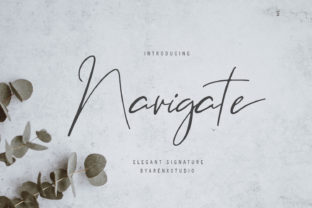
Enhance Your Web Design with the Navigate Script Font
Navigate is a dynamic script font that brings an authentic, handwritten feel to digital projects. Its unique style and cool aesthetic make it ideal for designers looking to add personality without sacrificing readability. As a web designer, I’ve found that fonts like Navigate can transform the visual tone of a site, making it more engaging and memorable.
Visual Characteristics and Style
The Navigate font features fluid, organic strokes that mimic natural handwriting. It has a relaxed yet professional appearance, striking a balance between casual and elegant. This makes it suitable for a wide range of applications, from creative portfolios to boutique online stores. The font's character shapes are consistent, ensuring that even in long text blocks, the design remains cohesive and visually appealing.
Its distinctiveness lies in its subtle variations in line thickness and slight imperfections, which give it a handcrafted look. These details help it stand out while still maintaining legibility on screens of various sizes.
Applying Navigate in Web Layouts
Navigate works exceptionally well in hero sections, where it can draw attention with its expressive letterforms. When used as a headline or subheading, it adds a touch of personality that can align with a brand’s voice. For instance, a coaching website could use Navigate for the main title of a service page, creating a warm and approachable feel.
On landing pages, Navigate can be used for call-to-action buttons or short promotional phrases. Its readability ensures users can quickly scan through content and take action. In online shop banners, it can highlight product names or special offers, adding a sense of urgency and excitement.
For blog headers or course sales pages, Navigate helps create a visually engaging hierarchy that guides the reader’s eye naturally. Pairing it with a clean sans serif font for body copy enhances contrast and improves overall readability.
Readability and Responsive Design
While Navigate is a script font, its design ensures it remains readable even at smaller sizes. However, it's best suited for headlines, titles, and short phrases rather than lengthy paragraphs. When using it on mobile screens, ensure sufficient spacing and contrast to maintain clarity.
In responsive layouts, consider how the font scales across different devices. Testing it on dark and light backgrounds can also reveal how it performs under various conditions. If using image overlays, ensure the font color stands out against the background to avoid readability issues.
Font Pairing and Brand Identity
Font pairing is crucial for achieving a balanced and harmonious design. Navigate pairs well with modern sans serif fonts like Helvetica or Arial for body text, offering a clear distinction between decorative and functional typography. For editorial designs, combining it with a serif font such as Georgia or Times New Roman can add a touch of sophistication.
When building a brand identity, the choice of font plays a significant role. Navigate’s unique style can reflect creativity and authenticity, making it perfect for digital brands that want to convey a personal, human touch. It’s especially effective in social media graphics, packaging design, and other branding materials where a distinctive visual presence is key.
Commercial Use and Licensing
Before implementing Navigate on client projects, online stores, or landing pages, ensure you have the appropriate commercial font license. Many premium fonts require specific licenses for web use, so always check the terms provided by the font vendor. This is particularly important when designing templates or brand assets that will be used across multiple platforms.
Also, verify if the font includes alternate characters, weights, and multilingual support. These features can expand its usability in global projects or for complex typographic needs.
Practical Applications for Different Projects
For a creative portfolio site, Navigate can be used in the header, section titles, and project descriptions to showcase a designer’s personality. On a boutique online store, it can highlight product names or promotional messages, reinforcing the brand’s unique identity.
In a coaching website, Navigate might be used for the main title and testimonials, creating a friendly and trustworthy atmosphere. For a product landing page, it can enhance the visual hierarchy by emphasizing key selling points and calls to action.
Even in digital ads or course sales pages, Navigate can capture attention and guide users toward conversion points. Its versatility allows it to fit into various contexts while maintaining a consistent and recognizable brand voice.
Whether you're working on a digital brand kit, editorial design, or interactive web experiences, Navigate offers a compelling solution that blends style with functionality. Its ability to adapt to different layouts and maintain readability makes it a valuable asset in any designer’s toolkit.